
Quotes your clients say yes to.
Sarvyam prices every quote from your real costs, sends a link your client approves, signs and pays the deposit on from their phone — and turns it into a booking. Built for decorators, florists, balloon artists, photographers, photo booths and rentals.
Quoting shouldn’t take your evenings.
Most event businesses quote with a mix of spreadsheets, documents and messages. It works — until it costs you a booking or your margin.
Copying last month’s price, or a competitor’s, without knowing what this job will really cost you.
Rebuilding a quote from scratch for every inquiry means the client hears from someone else first.
Edited PDFs and screenshots in a chat thread leave room for disputes about price and scope.
You send the quote and wait, with no way to know whether to follow up today or next week.
A verbal yes is not a booking. Chasing deposits by message is awkward and easy to forget.
Card fees, tax, travel, freelancers and extra hours on site quietly come out of your profit.
Build it in minutes. They approve on a phone.
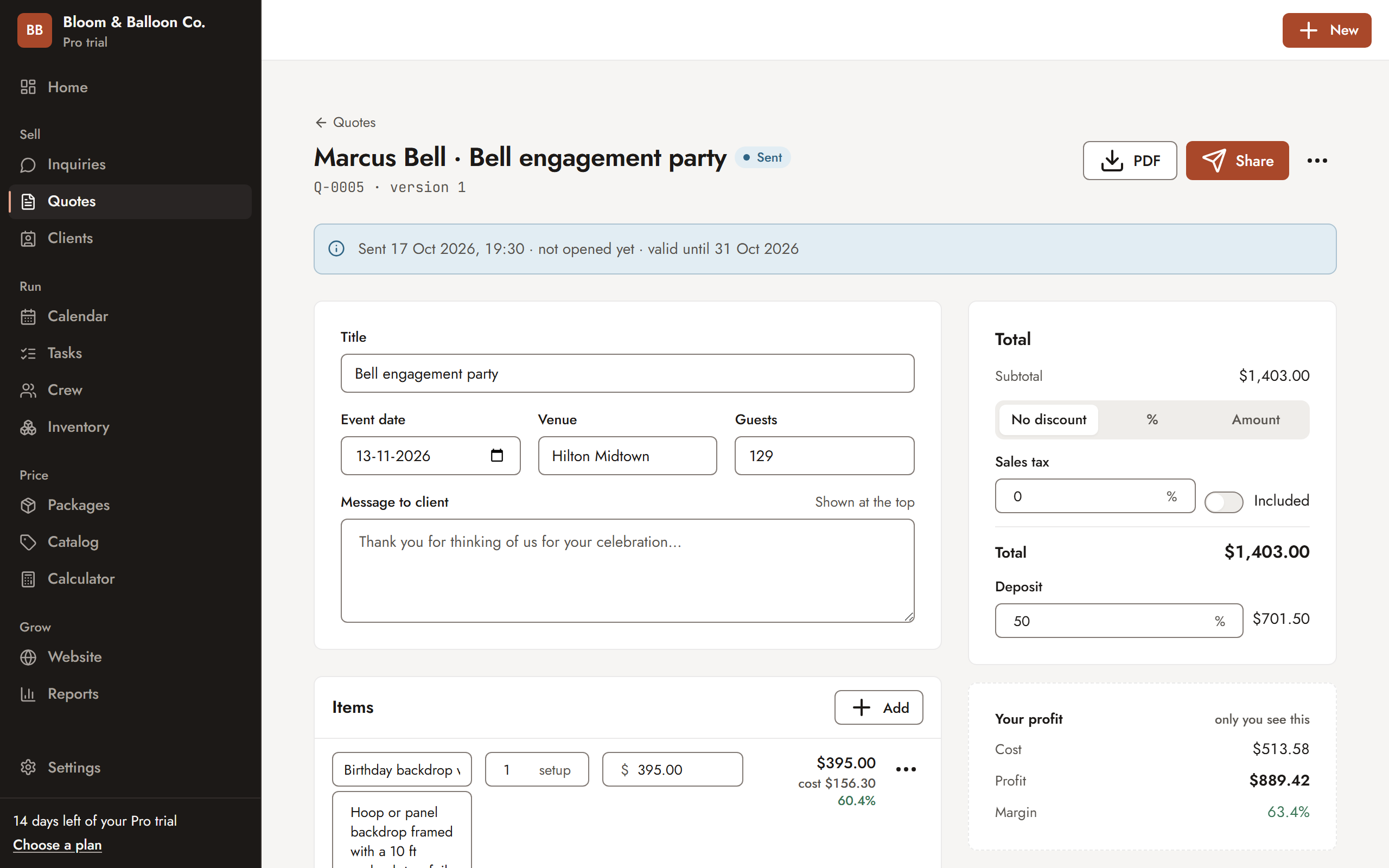
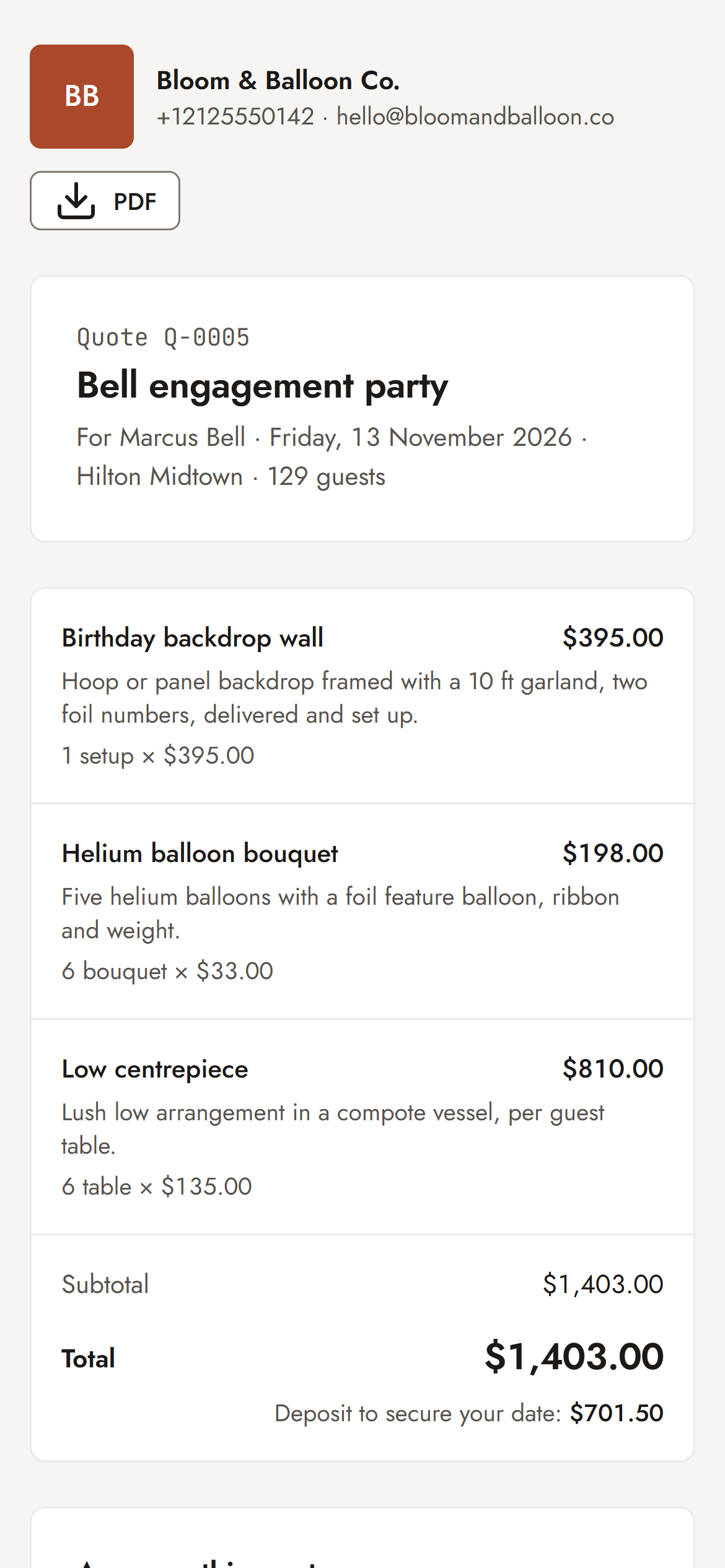
Add packages and quantities, mark upgrades as optional and check the profit before you send. Your client gets a link they can read, sign and pay a deposit on.
- Profit and margin on every quote
- Optional extras the client ticks themselves
- A PDF as well as the link
Priced right. Approved faster.
Everything between “Can you send me a quote?” and a paid deposit, in one place. Plans are noted where a feature needs one.
Quotes priced from real costs
Every package is built from what it uses — materials with waste, labour hours, travel and equipment wear — so the quote shows your profit and margin before you send it.
- Price by the item, stem, balloon, hour or metre
- Target margin or markup per business
- Update a cost once — every package follows
A link clients say yes to
Your client opens a clean, branded quote on their phone, ticks the optional extras they want, signs with their name and pays the deposit.
- Optional add-ons clients choose themselves
- Opened alerts so you follow up at the right time
- PDF included for print or email
Versions without confusion
Edit a quote after sending; the client sees the change only when you send the update. Changes after approval become a new version, not a giveaway.
Deposits on approval
Approval creates the payment schedule — deposit now, balance before the event. Record cash or transfers in two taps or send a card payment link paid straight into your account.
Starter and upAny country, currency and tax
24 currencies and VAT, GST or sales tax included or added, so prices read correctly where your clients are.
Inquiry to quote in one step
Inquiries from your page, Instagram, WhatsApp, email or calls sit in one pipeline. Date, guest count and budget carry straight into the quote.
Starter and upStarter packs for six trades
Balloon decor, florists, event decor, photography, photo booths and party rentals each load typical packages, materials, checklists and terms on day one.
From accepted quote to booking
An accepted quote becomes a booking on your calendar with clash warnings, your trade’s checklist, crew and stock — so nothing is double-booked.
Crew & stock: ProInquiry to deposit, step by step.
- Set up your catalog
Load your trade’s starter pack, then confirm your material prices, hourly rates and target margin. Every package shows its cost and profit.
- Capture the inquiry
The date, guest count, budget and contact details arrive from your page or are added in seconds from a DM or call.
- Build the quote
Add packages and quantities, mark upgrades as optional, apply tax and check the margin. Send it as a link and a PDF.
- Client approves, signs, pays
They open it on their phone, tick the add-ons, sign with their name and pay the deposit. You are told when it is opened and accepted.
- It becomes a booking
The date is confirmed on your calendar with the balance scheduled, your checklist, crew and stock — ready for the event.
Why not a spreadsheet or an invoicing app?
Both are fine tools. They just stop at the document — and event quotes need costing before and a booking after.
| Task | Spreadsheet + document | Generic invoicing app | Sarvyam |
|---|---|---|---|
| Price from materials, waste and hours | Your own formulas | Line items only | Costed packages |
| Profit and margin before sending | If you build it | Rarely | On every quote |
| Optional add-ons the client picks | No | Rarely | Yes |
| Online approval with signature | No | Some apps | Yes (Starter+) |
| Know when the quote was opened | No | Some apps | Yes |
| Deposit and balance schedule | Manual | Invoices only | Created on approval (Starter+) |
| Becomes a booking with checklist | No | No | Yes |
| Crew and stock without double-booking | No | No | Yes (Pro) |
Six trades. Free tools to start.
Each trade gets its own starter pack. Not ready to sign up? Check your numbers with a free calculator first.
Start free. Upgrade when it pays.
Price every job with confidence.
- Profit calculator and costing engine
- Industry starter packs
- 10 sent quotes a month
- 100 catalog items, 25 clients
Turn inquiries into paid bookings.
- Unlimited quotes, items and clients
- Inquiry pipeline and link-in-bio page
- Online approval with e-signature
- Calendar, deposits and payment tracking
Run the whole team and every event.
- Unlimited team members — no per-seat fees
- Crew and freelancer scheduling with clash checks
- Tasks, checklists, inventory and rentals
- One-page website in 10 themes, vendor timelines, reports
For photo and video studios that deliver.
- Everything in Pro
- Full website with shop, product pages and rentals
- Client galleries with 200 GB storage
- Proofing and favourites
Every new account gets 14 days of Pro, then falls back to Free — never charged automatically. Prices in US dollars; yearly plans get two months free. Compare all plans · Start free
Event quotation software: FAQ
What is event quotation software?
Software for creating, sending and tracking quotes for events — decor, flowers, balloons, photography, photo booths or rentals. Good event quotation software prices from your real costs, lets the client approve and sign online, and turns an accepted quote into a booking with a deposit, instead of leaving you to copy numbers between a spreadsheet, a document and your messages.
Can clients accept and sign a quote online?
Yes, on Starter and above. The client opens a link, chooses any optional extras, signs with their name and pays the deposit from their phone. You can see when the quote was opened and when it was accepted.
Can I change a quote after sending it?
Yes. Edit it at any time — the client sees the change only when you send the update, and each sent version is kept, so there is never confusion about which price was agreed.
Does it handle VAT, GST and sales tax?
Yes. Set your tax rate and whether prices include tax or have it added. Sarvyam supports 24 currencies and works in any country and timezone.
Which event businesses is it for?
Balloon artists, florists, event decorators and stylists, photographers and videographers, photo booth operators and party rental companies. Each trade has a starter pack with typical packages, materials, checklists and terms.
How much does it cost?
There is a Free plan with the costing engine and 10 sent quotes a month. Starter is $19 a month and adds unlimited quotes, online approval with e-signature, deposits and payment tracking; Pro is $49 a month with unlimited team members. New accounts get 14 days of Pro and are never charged automatically.

Send your next quote
in minutes.
Free forever plan. 14 days of Pro included. No card needed.